esp32wroom-Arduino
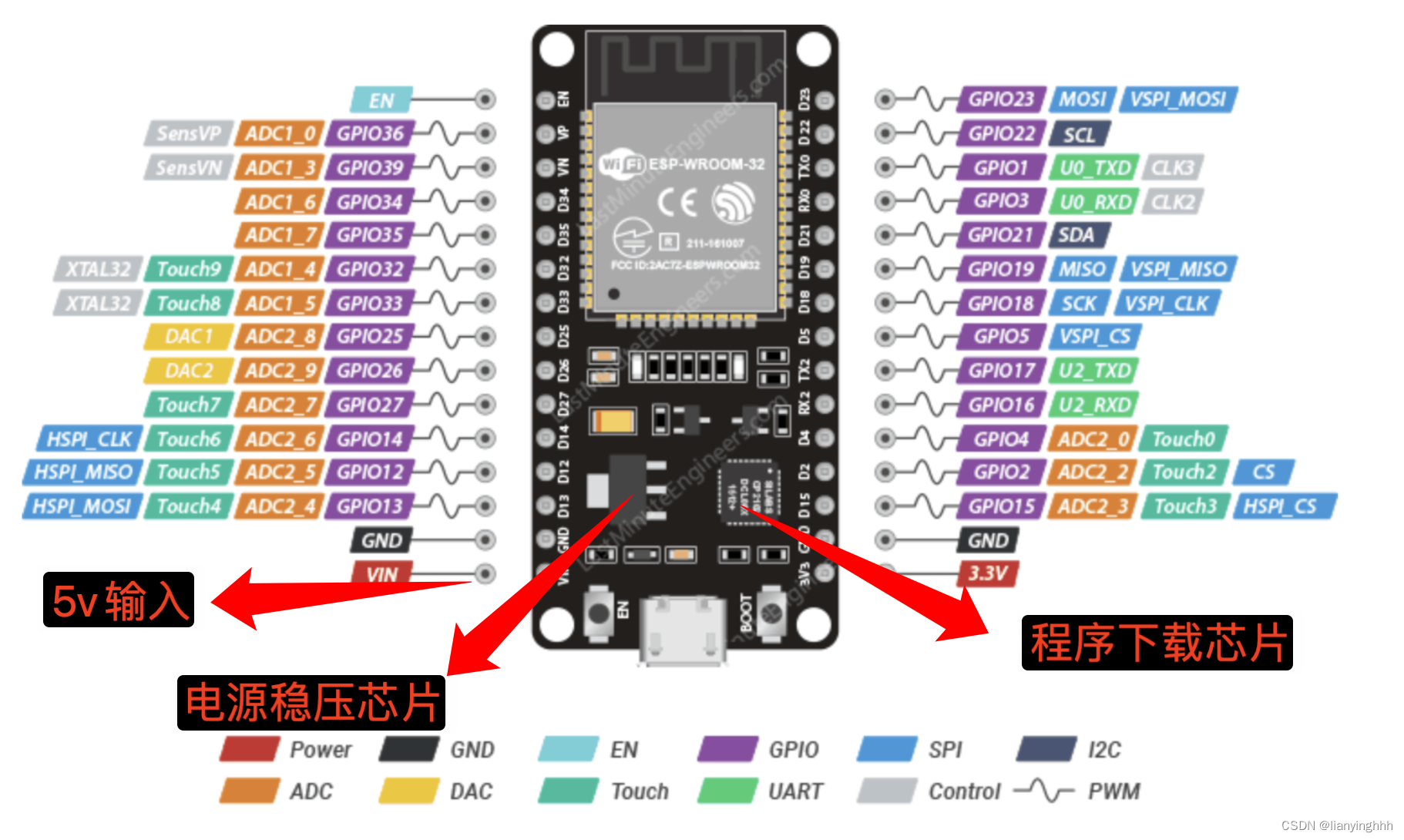
串口接收
#include <Arduino.h>

void setup()
{
  Serial.begin(115200);
}

void loop()
{

}

void serialEvent()
{

  // 串口接收函数
  String inputString = "";

  while (Serial.available())
  {
    char inChar = (char)Serial.read();
    inputString += inChar;
  }

  if (inputString.length() > 4)
  {
    Serial.print("Input String:");
    Serial.println(inputString);
  }
}
TaskScheduler
- platformio.ini 增加 arkhipenko/TaskScheduler@^3.8.5
[env:upesy_wroom]
platform = espressif32
board = upesy_wroom
framework = arduino
lib_deps =
	arkhipenko/TaskScheduler@^3.8.5
	bodmer/TFT_eSPI@^2.5.43
- 代码实例
#include <Arduino.h>
#include <TaskScheduler.h>


void runComeGoCallback()
{

}

Scheduler runner;
Task comeGoTask(100, TASK_FOREVER, &runComeGoCallback); // 延时100ms,永远重

void Tim1Interrupt()
{ // 中断服务函数

}

void setup()
{


  Serial.begin(115200);


  runner.init();
  runner.addTask(comeGoTask); // 添加name任务,name为上面的t1或t2或t3

  comeGoTask.enable(); // 使能name任务

  Serial.println("esp32111...");
}

void loop()
{
  runner.execute();
}
硬件定时器
代码说明
- 定时器的分频系数为 80,ESP32 的主频为 80 MHz,因此定时器的计数频率为 1 MHz。
timerAlarmWrite设置报警值为 500000,表示每 500000 微秒(即 500 毫秒)触发一次中断。- 在中断回调函数
timerISR中切换 LED 的状态。
#include <Arduino.h>

hw_timer_t* timer = NULL;

void IRAM_ATTR timerISR() {
  static bool ledState = LOW;
  digitalWrite(LED_BUILTIN, ledState); // 切换 LED 状态
  ledState = !ledState;
}

void setup() {
  pinMode(LED_BUILTIN, OUTPUT);

  // 初始化定时器
  timer = timerBegin(0, 80, true); // 使用定时器 0,分频系数为 80
  timerAttachInterrupt(timer, &timerISR, true); // 设置中断回调函数
  timerAlarmWrite(timer, 500000, true); // 定时器每隔 500000 微秒(500 毫秒)触发一次中断
  timerAlarmEnable(timer); // 启动定时器
}

void loop() {
  // 主循环为空,定时器中断负责切换 LED 状态
}
步进电机
#include <Arduino.h>

// 定义电机引脚
const int pinAPlus = 25;  // A
const int pinBPlus = 26; // B
const int pinAMinus = 15;  // A-
const int pinBMinus = 2;  // B-

// 定义电机步序(半步进模式)
const uint8_t step_sequence[] = {
  8, // Step 1
  12, // Step 2
  4, // Step 3
  6, // Step 4
  2,
  3,
  1,
  9
};

hw_timer_t* timer = NULL; // 硬件定时器
volatile int stepIndex = 0; // 当前步序索引
volatile int stepsCount = 0; // 剩余步数
volatile bool direction = true; // 方向标志(true 为正转)

volatile int steps_refine = 0; // 细化
volatile int steps_refine_count = 0; // 细化

// 定时器中断回调函数
void IRAM_ATTR timerISR() {
  if(steps_refine_count  >= steps_refine){
    steps_refine_count = 0;

    if (stepsCount > 0) {
      // 根据方向调整步序索引
      if (direction) {
        stepIndex = (stepIndex + 1) % 8; // 正转
      } else {
        stepIndex = (stepIndex - 1 + 8) % 8; // 反转
      }

      // 输出当前步序到电机引脚
      digitalWrite(pinAPlus, (step_sequence[stepIndex] >> 3) & 0x1);
      digitalWrite(pinBPlus, (step_sequence[stepIndex] >> 2) & 0x1);
      digitalWrite(pinAMinus , (step_sequence[stepIndex] >> 1) & 0x1);
      digitalWrite(pinBMinus, (step_sequence[stepIndex] >> 0) & 0x1);

      // 减少剩余步数
      stepsCount--;
    }
  }else{
    steps_refine_count++;
  }


}

void setup() {
  // 初始化电机引脚为输出模式
  pinMode(pinAPlus, OUTPUT);
  pinMode(pinAMinus, OUTPUT);
  pinMode(pinBPlus, OUTPUT);
  pinMode(pinBMinus, OUTPUT);

  Serial.begin(115200);

  // 初始化定时器
  timer = timerBegin(0, 80, true); // 使用定时器 0,分频系数为 80
  timerAttachInterrupt(timer, &timerISR, true); // 设置中断回调函数
  timerAlarmWrite(timer, 1000, true); // 设置报警值为 500000(1ms),自动重载
  timerAlarmEnable(timer); // 启动定时器

  // 设置初始运动参数
  direction = true; // 正转
  stepsCount = 0; // 脉冲数
}

void loop() {

}

void serialEvent()
{
  // 串口接收函数
  String inputString = "";

  while (Serial.available())
  {
    char inChar = (char)Serial.read();
    inputString += inChar;
  }

  if (inputString.length() > 4)
  {
    Serial.print("Input String:");
    Serial.println(inputString);
    String cmd = inputString.substring(0, 4);
    inputString.remove(0, 4);
    int inputValue = inputString.toInt();
    if (cmd == "DIR:")
    {
      direction = inputValue;
    }
    else if (cmd == "SET:")
    {
      stepsCount = inputValue;
    }
    else if (cmd == "SH0:")
    {
      steps_refine = inputValue;
    }
  }
}